

FastChat:LMSYS 开源大模型训练/服务/评测一体化平台与 Chatbot Arena 底座|部署与使用全指南
项目仓库: https://github.com/lm-sys/FastChat
开源协议:Apache 2.0 · 交付形态:Python 包 fschat +
命令行 + Gradio Web UI + OpenAI 兼容 REST API ·
核心组件:controller(21001)、model_worker(31000+)、gradio_web_server(7860)
· 官方 Demo:lmarena.ai
官方维护状态说明:FastChat 由 LMSYS 实验室维护,是 Chatbot Arena(lmarena.ai)的开源底座,已服务超 1000 万次对话请求、覆盖 70+ 模型,并积累超 150 万条人类投票用于 LLM Elo 排行榜。本文命令均取自官方 README。
1 项目简介
FastChat 是一个面向大语言模型聊天机器人的开源训练、服务与评测平台。它提供 Vicuna、LongChat、FastChat-T5 等模型的训练代码,以及一套分布式多模型服务系统——由 controller 协调、model_worker 承载权重、gradio_web_server 提供 Web 界面,并对外暴露 OpenAI 兼容 RESTful API。Chatbot Arena 真人对战评测即由该平台驱动。
非官方 / 第三方边界声明:Vicuna 权重基于 Llama 2 训练,需遵守 Llama 模型许可;FastChat 代码本身为 Apache 2.0。对接 OpenAI / Anthropic / Gemini 等商业 API 需自备密钥。
1.1 核心信息一览
| 项目项 | 内容 |
|---|---|
| 项目名称 | FastChat(包名 fschat) |
| 仓库地址 | github.com/lm-sys/FastChat |
| 项目定位 | 大模型训练 / 分布式服务 / 评测一体化平台 |
| 开源协议 | Apache 2.0(代码);Vicuna 权重受 Llama 许可约束 |
| 安装方式 | pip3 install "fschat[model_worker,webui]" |
| 服务架构 | controller + 多个 model_worker + gradio_web_server |
| 默认端口 | controller 21001;model_worker
31000;gradio 7860 |
| OpenAI 兼容 API | 由 openai_api_server 提供 |
| 官方 Demo | lmarena.ai |
1.2 适用场景
- 希望在本地或私有服务器上同时跑多个开源模型(Vicuna、LongChat、ChatGLM、Falcon、WizardLM 等),通过统一 Web 界面切换对话。
- 需要 OpenAI 兼容 API,把现有基于
openai-python的脚本无缝切换到本地模型。 - 复现 Chatbot Arena 左右对战 UI,做模型 A/B 或人机评测。
- 基于
fastchat/train/train_mem.py与 ShareGPT 风格多轮对话数据做 Vicuna 风格微调。
1.3 能力边界(官方口径)
- 仓库自述为 "open platform for training, serving, and evaluating large language model based chatbots",覆盖训练、服务、评测三大块,但不提供生产级鉴权、计费与多租户管理。
- 默认 model_worker 基于
transformers,兼容性好但吞吐有限;高吞吐场景官方推荐接入 vLLM(见
docs/vllm_integration.md)。 - 显存不足时可通过
--load-8bit与--cpu-offloading降低占用,但会损失部分精度或速度。
2 功能特性
2.1 三组件分布式服务
- controller:管理所有 model_worker 的注册与路由,本身不加载模型。
- model_worker:加载一个或多个模型,向 controller 注册;可在不同 GPU 上启动多个 worker。
- gradio_web_server:面向用户的 Gradio Web UI;另有
gradio_web_server_multi提供多 Tab 与 Chatbot Arena 对战视图。
2.2 广泛模型支持
README 列出支持 Llama
2、Vicuna、Alpaca、Baize、ChatGLM、Dolly、Falcon、FastChat-T5、GPT4ALL、Guanaco、OpenAssistant、OpenChat、RedPajama、StableLM、WizardLM
等;新增模型指引见 docs/model_support.md。
2.3 多后端与量化
- 单卡 /
多卡(
--num-gpus N)、CPU(--device cpu)、Apple Silicon MPS(--device mps)、Intel XPU、Ascend NPU。 - 8bit 量化(
--load-8bit)、CPU offloading(--cpu-offloading,需 bitsandbytes,仅 Linux)。 - 兼容 ExLlama V2、GPTQ 4bit、AWQ 4bit;中文用户可通过
export FASTCHAT_USE_MODELSCOPE=True走 ModelScope 拉权重。
2.4 OpenAI 兼容 API
openai_api_server 暴露与 OpenAI 一致的
/v1/chat/completions 等端点,可直接被
openai-python SDK 与 cURL 调用,详见
docs/openai_api.md。
2.5 评测与训练
- MT-Bench:多轮开放式问题集,用强模型(如
GPT-4)做裁判自动打分,见
fastchat/llm_judge。 - 微调:基于 Stanford Alpaca 扩展支持多轮对话,Vicuna-13B 官方超参:全局 batch 128、lr 2e-5、3 epochs、max length 2048。
3 官方界面预览
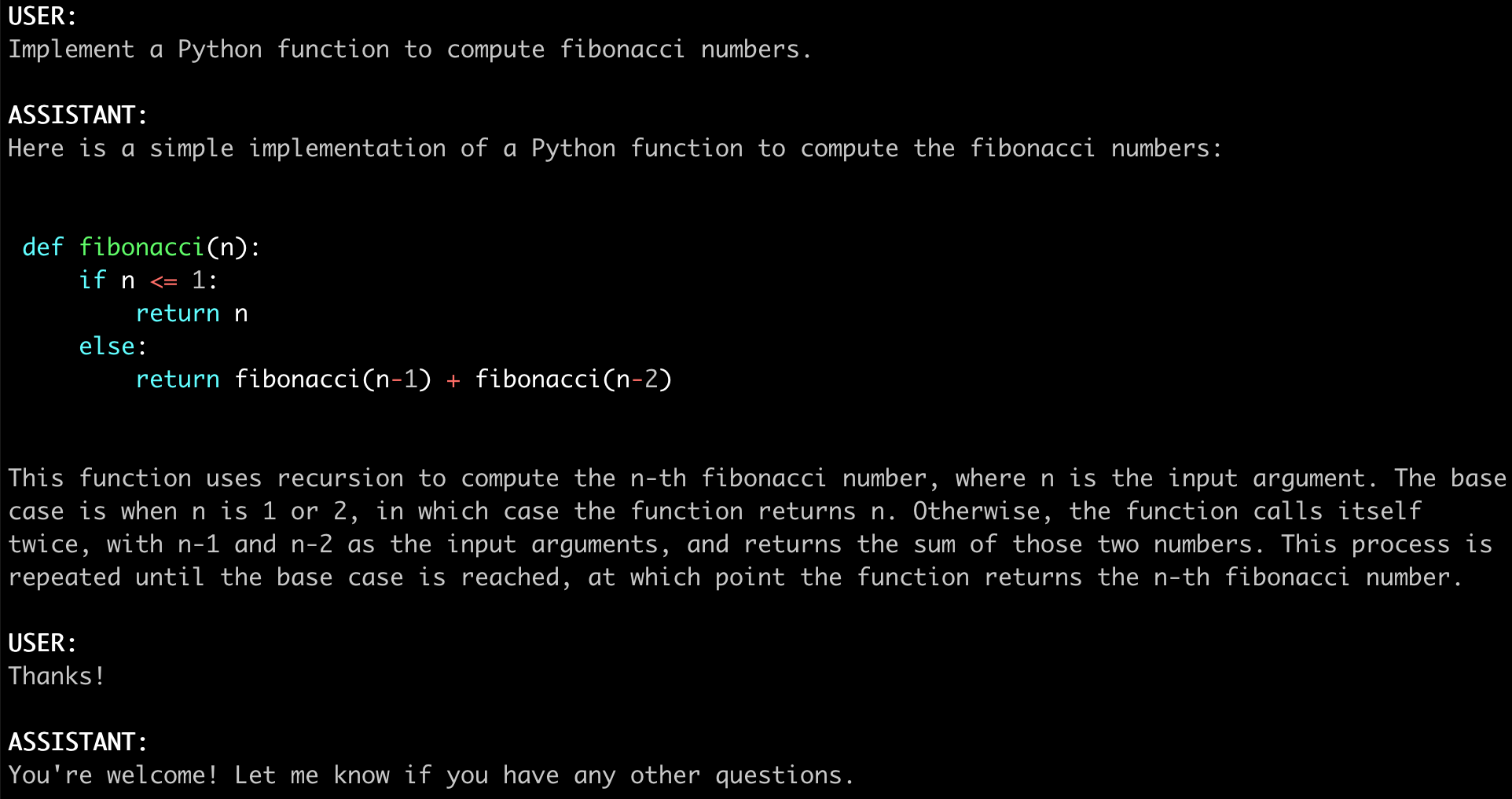
3.1 命令行对话
下图为 FastChat CLI 直接在终端中与模型对话的官方截图:
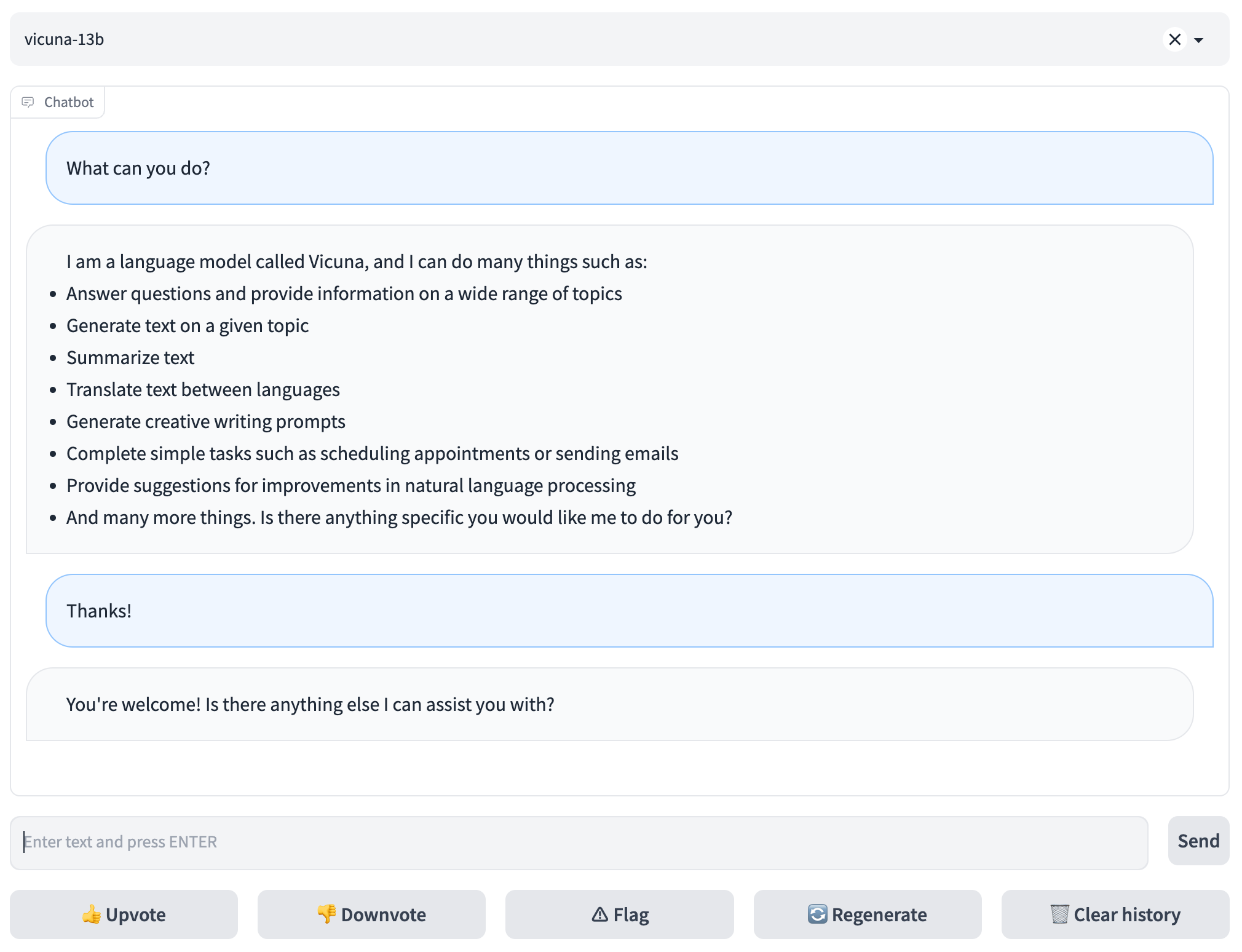
3.2 Gradio Web UI
下图为 FastChat 自带的 Gradio Web 界面,用户可在浏览器中选择模型、多轮对话:
4 官方跳转链接汇总
| 类别 | 链接 | 说明 |
|---|---|---|
| 仓库主页 | github.com/lm-sys/FastChat | 源码、README、docs |
| 在线 Demo | lmarena.ai | Chatbot Arena 与 LLM Elo 榜 |
| 文档目录 | docs/ | 模型支持、API、vLLM 集成、训练 |
| Vicuna 博客 | lmsys.org/blog/2023-03-30-vicuna | Vicuna 发布说明 |
| Hugging Face | huggingface.co/lmsys | Vicuna、LongChat、FastChat-T5 权重 |
| Discord | discord.gg/6GXcFg3TH8 | 社区 |
| X | x.com/lmsysorg | 官方动态 |
| 技术报告 | arxiv.org/abs/2403.04132 | Chatbot Arena 技术报告 |
5 前置要求与服务器配置
5.1 软件前提
- Python 3.10+、pip
已升级(
pip3 install --upgrade pip,启用 PEP 660)。 - NVIDIA GPU + CUDA(推荐);CPU 推理可行但极慢。
- macOS 源码安装需
brew install rust cmake。 - 多卡模型并行需 PyTorch 支持。
5.2 硬件建议
| 模型 | 显存需求 | 说明 |
|---|---|---|
| Vicuna-7B | 约 14 GB | 单卡 |
| Vicuna-13B | 约 28 GB | 单卡或多卡 |
| Vicuna-13B + 8bit | 约 16 GB | RTX 3090 / 4080 / T4 / V100 16GB 可跑 |
| Vicuna-7B CPU | 约 30 GB 内存 | --device cpu |
| Vicuna-13B CPU | 约 60 GB 内存 | --device cpu |
5.3 端口说明
| 端口 | 服务 | 默认绑定 | 用途 |
|---|---|---|---|
| 21001 | controller | 127.0.0.1 |
worker 注册与路由 |
| 31000 | model_worker 0 | 127.0.0.1 |
模型推理 HTTP |
| 31001 | model_worker 1 | 127.0.0.1 |
第二个模型 |
| 7860 | gradio_web_server | 127.0.0.1 |
Web UI |
| 8000(可选) | openai_api_server | 127.0.0.1 |
OpenAI 兼容 API |
6 方式一:pip 安装 + 三组件 Web 服务(推荐)
6.1 安装
pip3 install "fschat[model_worker,webui]"6.2 启动 controller
python3 -m fastchat.serve.controller6.3 启动 model_worker
# 等待模型加载完成,看到 "Uvicorn running on ..." 即注册成功
python3 -m fastchat.serve.model_worker --model-path lmsys/vicuna-7b-v1.5
另开终端验证连通:
python3 -m fastchat.serve.test_message --model-name vicuna-7b-v1.56.4 启动 Gradio Web UI
python3 -m fastchat.serve.gradio_web_server浏览器打开 http://localhost:7860
即可对话。模型列表若不出现,重启 gradio_web_server。
6.5 多 worker 与多卡
# worker 0:占用 0 号 GPU
CUDA_VISIBLE_DEVICES=0 python3 -m fastchat.serve.model_worker \
    --model-path lmsys/vicuna-7b-v1.5 \
    --controller http://localhost:21001 \
    --port 31000 --worker http://localhost:31000

# worker 1:占用 1 号 GPU,跑另一个模型
CUDA_VISIBLE_DEVICES=1 python3 -m fastchat.serve.model_worker \
    --model-path lmsys/fastchat-t5-3b-v1.0 \
    --controller http://localhost:21001 \
    --port 31001 --worker http://localhost:31001
6.6 启动 Chatbot Arena 对战 UI
新建 api_endpoint.json 配置商业 API:
{
  "gpt-4o-2024-05-13": {
    "model_name": "gpt-4o-2024-05-13",
    "api_base": "https://api.openai.com/v1",
    "api_type": "openai",
    "api_key": "<你的 OPENAI_API_KEY>",
    "anony_only": false
  }
}
启动多 Tab 对战服务器:
python3 -m fastchat.serve.gradio_web_server_multi \
    --register-api-endpoint-file api_endpoint.json
7 方式二:命令行单 GPU 推理(最简)
# 单卡 Vicuna-7B
python3 -m fastchat.serve.cli --model-path lmsys/vicuna-7b-v1.5

# 多卡聚合
python3 -m fastchat.serve.cli --model-path lmsys/vicuna-7b-v1.5 --num-gpus 2

# 指定每卡最大显存
python3 -m fastchat.serve.cli --model-path lmsys/vicuna-7b-v1.5 \
    --num-gpus 2 --max-gpu-memory 8GiB

# CPU 推理
python3 -m fastchat.serve.cli --model-path lmsys/vicuna-7b-v1.5 --device cpu

# Apple Silicon MPS + 8bit
python3 -m fastchat.serve.cli --model-path lmsys/vicuna-7b-v1.5 \
    --device mps --load-8bit

# 显存不足时
python3 -m fastchat.serve.cli --model-path lmsys/vicuna-7b-v1.5 --load-8bit
python3 -m fastchat.serve.cli --model-path lmsys/vicuna-7b-v1.5 \
    --load-8bit --cpu-offloading
8 方式三:源码安装与微调训练
8.1 源码安装
git clone https://github.com/lm-sys/FastChat.git
cd FastChat
# macOS: brew install rust cmake
pip3 install --upgrade pip
pip3 install -e ".[model_worker,webui]"
8.2 Vicuna-7B 微调示例(4×A100 40GB)
pip3 install -e ".[train]"

torchrun --nproc_per_node=4 --master_port=20001 fastchat/train/train_mem.py \
    --model_name_or_path meta-llama/Llama-2-7b-hf \
    --data_path data/dummy_conversation.json \
    --bf16 True \
    --output_dir output_vicuna \
    --num_train_epochs 3 \
    --per_device_train_batch_size 2 \
    --per_device_eval_batch_size 2 \
    --gradient_accumulation_steps 16 \
    --evaluation_strategy "no" \
    --save_strategy "steps" \
    --save_steps 1200 \
    --save_total_limit 10 \
    --learning_rate 2e-5 \
    --weight_decay 0. \
    --warmup_ratio 0.03 \
    --lr_scheduler_type "cosine" \
    --logging_steps 1 \
    --fsdp "full_shard auto_wrap" \
    --fsdp_transformer_layer_cls_to_wrap 'LlamaDecoderLayer' \
    --tf32 True \
    --model_max_length 2048 \
    --gradient_checkpointing True \
    --lazy_preprocess True
9 配置项说明
9.1 CLI 关键参数
| 参数 | 用途 | 示例 |
|---|---|---|
--model-path |
本地目录或 Hugging Face repo id | lmsys/vicuna-7b-v1.5 |
--num-gpus |
模型并行 GPU 数 | 2 |
--max-gpu-memory |
每卡最大显存 | 8GiB |
--device |
推理后端 | cuda / cpu / mps /
xpu / npu |
--load-8bit |
8bit 量化 | 开启 |
--cpu-offloading |
权重 CPU 卸载(需 8bit) | 开启 |
--style rich |
富文本流式输出 | 实验性 |
9.2 model_worker 关键参数
| 参数 | 用途 |
|---|---|
--controller |
controller 地址,默认 http://localhost:21001 |
--port / --worker |
worker 监听端口与对外地址 |
--model-path |
模型权重路径 |
9.3 环境变量
| 变量 | 用途 |
|---|---|
FASTCHAT_USE_MODELSCOPE=True |
中文用户从 ModelScope 拉权重 |
CUDA_VISIBLE_DEVICES |
指定 worker 可见 GPU |
CPU_ISA=amx |
Intel CPU AVX512_BF16/AMX 加速 |
10 常用运维命令
# 查看已加载模型
python3 -m fastchat.serve.test_message --model-name vicuna-7b-v1.5

# 查看 GPU 占用
nvidia-smi

# 查看 controller 注册的 worker
curl http://localhost:21001/list_models

# 停止所有 FastChat 进程
pkill -f fastchat.serve

# 查看 Hugging Face 缓存
ls ~/.cache/huggingface/hub/
11 常见故障排查
- Web UI 看不到模型:model_worker 尚未加载完成,或 controller 未启动;等待看到 "Uvicorn running" 后重启 gradio_web_server。
- OOM 显存不足:加
--load-8bit,或--cpu-offloading(仅 Linux);多卡用--num-gpus。 - 多卡显存分配不均:用
--max-gpu-memory 8GiB显式约束每卡权重占用。 - transformers 16K 模型报错:需
transformers>=4.31。 - Apple Silicon 推理慢:Vicuna-7B 在 32GB M1 上约 1–2 token/s,属正常。
- Mac 源码安装失败:先
brew install rust cmake。 - CPU offloading 不可用:仅 Linux 支持 bitsandbytes;Windows / macOS 请改用 8bit。
- 中文拉权重慢:
export FASTCHAT_USE_MODELSCOPE=True走 ModelScope。
12 风险与合规说明
- 模型许可:Vicuna 基于 Llama 2,须遵守 Llama 社区许可;其他模型按各自仓库许可。
- API 密钥:
api_endpoint.json中的商业 API Key 严禁提交到公开仓库。 - 公网部署:默认监听
127.0.0.1,对公网开放须自行加反代鉴权与速率限制。 - 内容风险:模型生成内容可能不合规,建议在 Web 前置审核。
- 本文非官方文档:命令取自官方 README;如官方文档更新,以 github.com/lm-sys/FastChat 最新说明为准。