

仓库:https://github.com/unslothai/unsloth 官方文档:https://unsloth.ai/docs 下载:https://unsloth.ai/download 运行形态:桌面应用(Windows / macOS / Linux)+ 脚本安装 + Docker
1. 项目简介
Unsloth 是首个"桌面端即可运行与训练模型"的应用。官方定位是让用户在桌面一键跑、训练开源大模型,主打比传统 PyTorch 训练更快、更省显存。提供 Windows / macOS / Ubuntu / Linux AppImage 等原生安装包。
1.1 核心信息一览
| 项目 | 内容 |
|---|---|
| 仓库 | unslothai/unsloth |
| 定位 | 桌面端模型运行与训练应用 |
| 安装 | 桌面安装包 / 脚本 / Docker |
| Linux 脚本 | curl -fsSL https://unsloth.ai/install.sh | sh |
| Windows | irm https://unsloth.ai/install.ps1 | iex |
| Docker | unsloth/unsloth |
1.2 适用场景
- 想在桌面直接跑 / 训练开源模型而不搭复杂环境;
- 需要比传统框架更快、更省显存的微调;
- 跨 Windows / Mac / Linux 一致体验。
1.3 能力边界(官方口径)
- 以桌面应用为主要交付形态;
- 高级用法见官方文档;
- Docker 镜像用于服务器场景。
2. 功能特性
- 桌面原生应用:Windows / macOS / Linux 安装包;
- 运行与训练一体:本地跑模型、做微调;
- 官方文档:https://unsloth.ai/docs;
- Docker 镜像:服务器化部署
unsloth/unsloth。
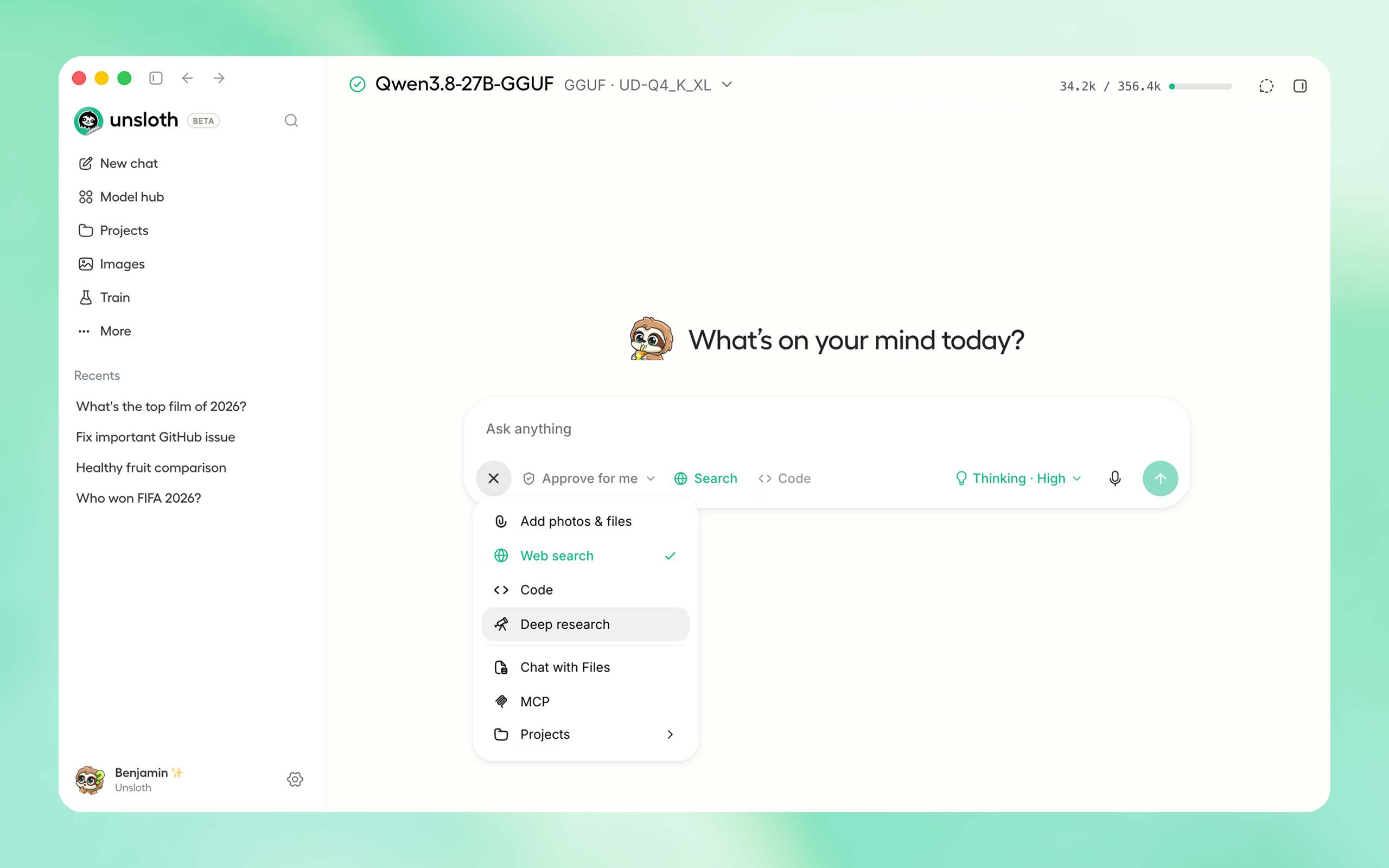
3. 官方界面预览
上图为官方 README 的桌面应用界面(README 官方素材)。
4. 官方跳转链接汇总
- 仓库主页:https://github.com/unslothai/unsloth
- 文档:https://unsloth.ai/docs
- 下载:https://unsloth.ai/download
- Releases:https://github.com/unslothai/unsloth/releases
- Docker:https://hub.docker.com/r/unsloth/unsloth
5. 前置要求与服务器配置
- 桌面系统(Windows / macOS / Linux);
- 训练场景需 NVIDIA GPU(以官方文档为准);
- 服务器用 Docker 镜像。
6. 方式一:桌面安装包(推荐)
从 https://unsloth.ai/download 或 GitHub Releases 下载对应平台安装包:
- Windows:
Unsloth-Desktop-Windows.exe - macOS:
Unsloth-Desktop-MacOS.dmg - Ubuntu:
Unsloth-Desktop-Ubuntu.deb(含 ARM64) - Linux:
Unsloth-Desktop-Linux.AppImage
7. 方式二:脚本与 Docker
Linux 脚本一键安装:
curl -fsSL https://unsloth.ai/install.sh | shWindows PowerShell:
irm https://unsloth.ai/install.ps1 | iexmacOS Homebrew:
brew install --cask unslothDocker:
# 镜像 unsloth/unsloth,用法见官方文档
docker run ... unsloth/unsloth
8. 配置项说明
| 配置 | 说明 |
|---|---|
| 桌面安装包 | 各平台原生安装 |
| install.sh / install.ps1 | 脚本安装 |
unsloth/unsloth |
Docker 镜像 |
| 模型与训练参数 | 在桌面应用内配置 |
9. 常用运维命令
# Linux 安装
curl -fsSL https://unsloth.ai/install.sh | sh

# macOS
brew install --cask unsloth

# 升级:重新运行安装包 / 脚本
10. 常见故障排查
- 安装失败:确认平台与架构(x86_64 / ARM64)匹配;
- GPU 不识别:按官方文档确认驱动与 CUDA;
- Docker 用法:参考 https://unsloth.ai/docs/get-started/install/docker。
11. 风险与合规说明
- 许可证以仓库 LICENSE 为准;
- 模型权重遵守各自许可;
- GPU 成本由使用者承担;
- 本文为社区部署笔记,命令以官方文档最新版本为准。