

Segment Anything(SAM):Meta 出品的可提示图像分割基础模型|部署与使用全指南
项目仓库: https://github.com/facebookresearch/segment-anything
论文:Segment Anything · 维护方:Meta AI Research (FAIR) · 语言:Python · 框架:PyTorch · 形态:Python 库 + 命令行脚本 · 数据集:SA-1B(1100 万图 / 11 亿掩码)
1 项目简介
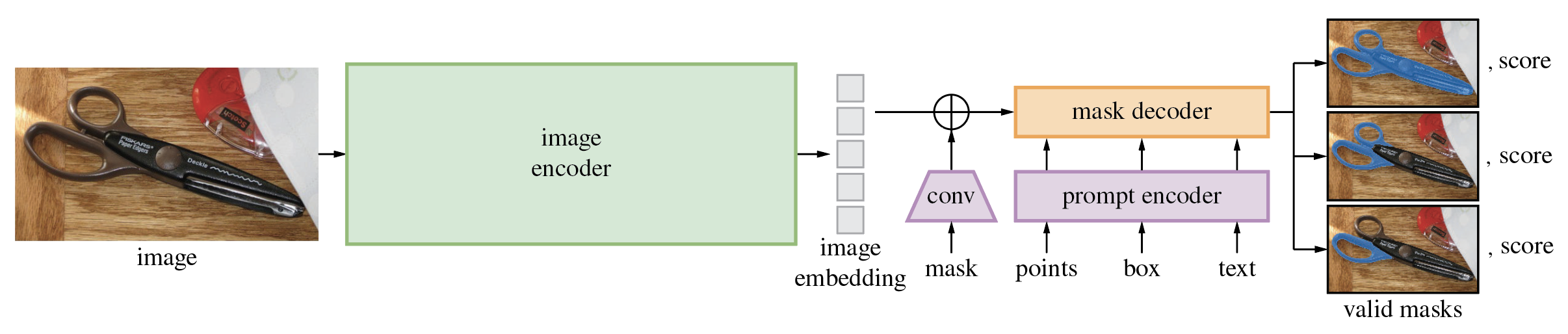
Segment Anything Model(SAM)是 Meta 提出的"分割一切"基础模型:给定输入提示(点、框、掩码、文本概念),模型输出高质量的对象掩码。它在 1100 万张图像、11 亿个掩码上训练,在多种分割任务上具备强零样本迁移能力。
官方已发布后继版本 SAM 2(支持图像与视频),但本仓库 SAM 仍是静态图像分割的经典参考实现。
1.1 核心信息一览
| 项目项 | 内容 |
|---|---|
| 项目名称 | Segment Anything Model (SAM) |
| 仓库地址 | github.com/facebookresearch/segment-anything |
| 项目定位 | 可提示的图像分割基础模型 |
| 维护方 | Meta AI Research, FAIR |
| 论文 | ai.facebook.com/research/publications/segment-anything |
| 项目主页 | segment-anything.com |
| 在线 Demo | segment-anything.com/demo |
| 数据集 | SA-1B |
| 模型权重 | ViT-H / ViT-L / ViT-B 三档 |
| 形态 | Python 库 + 命令行脚本 + ONNX 导出 |
1.2 适用场景
- 给任意图像自动生成所有对象掩码(自动分割)。
- 按点 / 框提示交互式分割对象。
- 作为下游视觉任务(检测、编辑、抠图)的前置分割模块。
- 导出 ONNX 在浏览器 / 边缘设备运行。
1.3 能力边界(官方口径)
- 官方已推出 SAM 2,支持图像与视频;新项目建议优先用 SAM 2。
- SAM 在 11M 图像 / 1.1B 掩码上训练;零样本能力强,但在特定领域可能需要微调。
2 功能特性
- 可提示分割:点、框、掩码作为提示。
- 自动掩码生成:
SamAutomaticMaskGenerator一次输出图中所有对象掩码。 - 三档权重:ViT-H(最大最准)、ViT-L、ViT-B(最轻)。
- ONNX 导出:mask decoder 可导出 ONNX,在浏览器 / 任意 ONNX Runtime 环境运行。
- 示例 Notebook:提示式预测、自动掩码生成、ONNX 导出。
3 官方界面预览
官方在线 Demo:segment-anything.com/demo。
4 官方跳转链接汇总
| 类别 | 链接 | 说明 |
|---|---|---|
| 仓库 | github.com/facebookresearch/segment-anything | 源码 |
| 项目主页 | segment-anything.com | 论文、Demo、数据集 |
| SAM 2 | facebookresearch/segment-anything-2 | 图像+视频版本 |
| 数据集 | SA-1B 下载 | 11M 图 / 1.1B 掩码 |
5 前置要求与服务器配置
5.1 软件前提
- Python ≥ 3.8。
- PyTorch ≥ 1.7、torchvision ≥ 0.8(推荐 CUDA 版)。
- 可选:opencv-python、pycocotools、matplotlib、onnxruntime、onnx(掩码后处理、COCO、ONNX 导出)。
5.2 硬件建议
| 模型 | 权重 | 建议显存 |
|---|---|---|
| ViT-B | 最轻 | 4–6 GB |
| ViT-L | 中等 | 8–10 GB |
| ViT-H | 最大 | 12 GB 以上 |
5.3 端口
库形态,无 HTTP 服务端口。
6 方式一:pip 安装与 Python 调用
pip install git+https://github.com/facebookresearch/segment-anything.git

# 可选依赖
pip install opencv-python pycocotools matplotlib onnxruntime onnx
6.1 按提示分割(点 / 框)
from segment_anything import SamPredictor, sam_model_registry

sam = sam_model_registry["vit_h"](checkpoint="sam_vit_h_4b8939.pth")
predictor = SamPredictor(sam)
predictor.set_image(<your_image>)
masks, _, _ = predictor.predict(<input_prompts>)
6.2 自动生成整图掩码
from segment_anything import SamAutomaticMaskGenerator, sam_model_registry

sam = sam_model_registry["vit_h"](checkpoint="sam_vit_h_4b8939.pth")
mask_generator = SamAutomaticMaskGenerator(sam)
masks = mask_generator.generate(<your_image>)
6.3 命令行批量处理
python scripts/amg.py \
  --checkpoint sam_vit_h_4b8939.pth \
  --model-type vit_h \
  --input <image_or_folder> \
  --output <path/to/output>
7 方式二:克隆仓库安装
git clone git@github.com:facebookresearch/segment-anything.git
cd segment-anything
pip install -e .
8 模型权重
| 模型类型 | 权重下载 |
|---|---|
default / vit_h |
sam_vit_h_4b8939.pth |
vit_l |
sam_vit_l_0b3195.pth |
vit_b |
sam_vit_b_01ec64.pth |
9 ONNX 导出
python scripts/export_onnx_model.py \
  --checkpoint sam_vit_h_4b8939.pth \
  --model-type vit_h \
  --output sam_onnx/sam_vit_h.onnx
导出后可在任意 ONNX Runtime 环境运行,官方 demo/
目录提供了浏览器 React 示例。
10 常用运维命令
# 查看版本
pip show segment-anything

# 更新
pip install --upgrade git+https://github.com/facebookresearch/segment-anything.git

# GPU
nvidia-smi
11 常见故障排查与风险
- 显存不足:换更小的 ViT-B,或开启 CUDA offload。
- 想做视频分割:用 SAM 2(本仓库只支持静态图)。
- 数据集许可:SA-1B 数据集下载即视为接受 Research License,商用需另行确认。
- 输出掩码版权:使用者对生成内容负责。
本文基于官方 README 整理,仅供学习与部署参考;以仓库最新说明为准。