

Pydantic AI:Pydantic 官方的类型安全 Python Agent 框架|部署与使用全指南
适用版本段:本文基于 pydantic-ai 2.x(PyPI 最新 2.61.0,调研日期 2026 年 10 月)撰写。GitHub 仓库
pydantic/pydantic-ai约 20.9k star,CI 覆盖率 100%,License 为 MIT。由 Pydantic 团队官方维护,迭代节奏很快,文中 API 以 v2 文档(pydantic.dev/docs/ai)为准;如与你安装的小版本有出入,以官方文档为准。

Pydantic AI 是 Pydantic 团队出品的 Python Agent 框架:把「结构化输出、工具调用、依赖注入」全部做成端到端类型安全——IDE、mypy 和 LLM 看到的是同一份类型。换模型只需换一个字符串前缀(OpenAI、Anthropic、Google、Groq、Mistral、Cohere、Ollama 等数十家),同时原生支持 MCP、Graph 工作流、流式输出、Logfire/OpenTelemetry 可观测。它是纯 Python 库,不是服务器:用 pip install 装进你的项目即可,天然适合与 FastAPI 搭配。
一、项目介绍与适用场景
定位:「How Python does AI」——一个类型安全、可测试的 Agent 循环(agent loop)。它不替代 LangChain 式的编排全家桶,而是提供一个薄薄的、可组合的 Agent 抽象,加上官方的能力库(Harness)、评估库(Evals)、图控制流(Pydantic Graph)。
不适合的场景:需要可视拖拽编排(用 Dify/n8n 更合适);需要现成服务器与记忆数据库(用 Letta 这类 Agent server);非 Python 技术栈(官方仅 Python,TypeScript 不在本项目内)。
二、核心功能逐条拆解
任意模型一个 API:
Agent('openai:gpt-5')、Agent('anthropic:claude-sonnet-4-5')、Agent('google-gla:gemini-2.5-pro')、Agent('ollama:qwen3')……换模型就是换字符串,旗舰能力不被某一家锁定。结构化输出(structured output):
output_type=某个 Pydantic BaseModel,每次 run 返回通过校验的强类型对象;校验失败会自动重试。工具调用(tool calling):
@agent.tool装饰器把普通函数变成工具,签名+docstring 自动生成 JSON schema,参数先校验再执行。依赖注入:
deps_type+RunContext[Deps],把数据库连接、HTTP client、用户上下文注入 tools 和 instructions。流式输出:
run_stream()/stream_text()支持边生成边消费,含结构化输出的增量校验。会话历史:
message_history=result.all_messages()把上一轮消息传给下一轮,实现多轮对话持久化。MCP 支持:
mcpextra 后可直接挂载 MCP server(stdio / HTTP),把外部工具集喂给 Agent。Pydantic Graph:一个 agent loop 不够时,用类型化的图工作流表达复杂控制流。
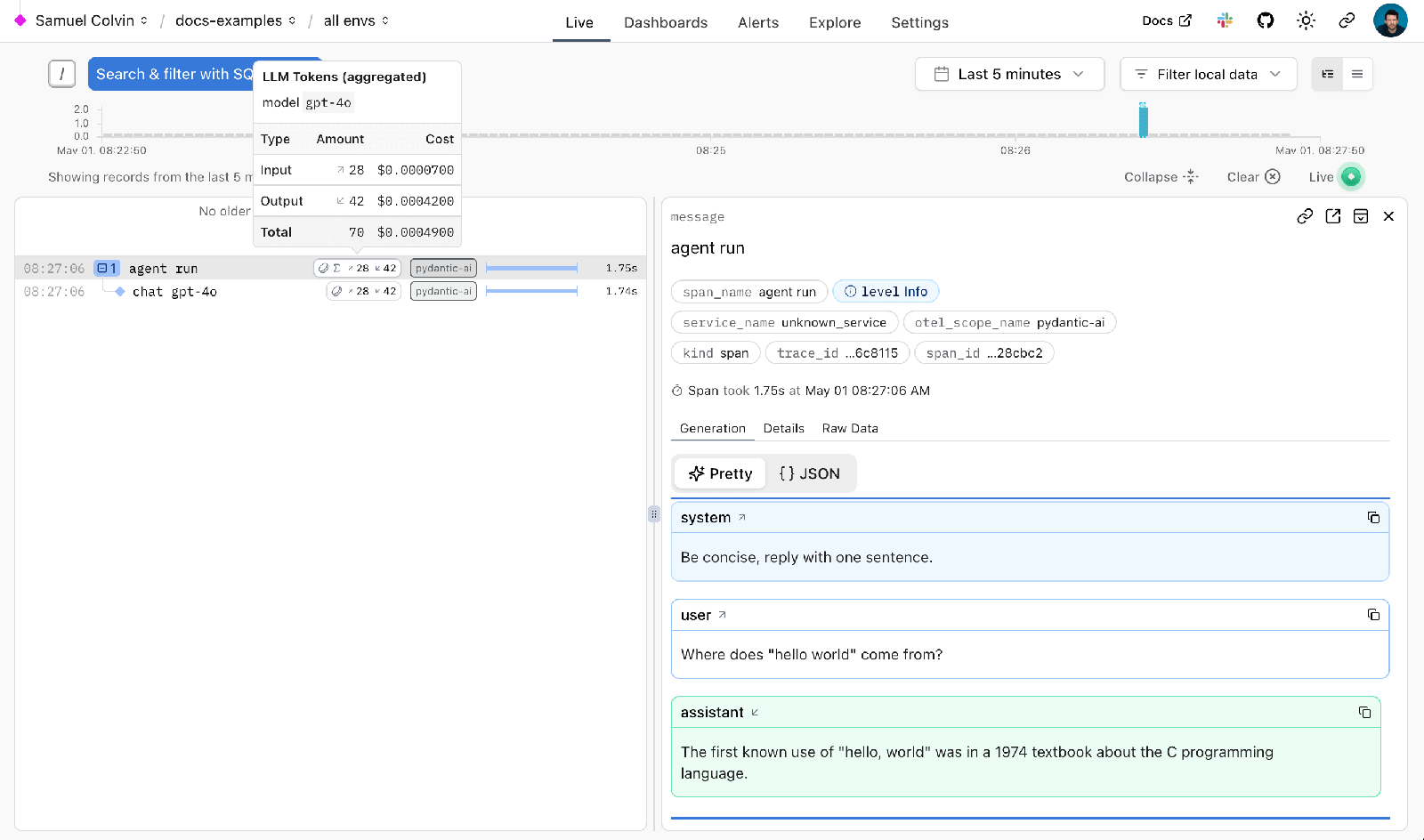
Logfire 可观测:两行代码接入 Pydantic Logfire(或任意 OpenTelemetry 后端),每次模型调用与工具调用都有 trace 和成本统计。
多前端:同一个 Agent 可跑在 CLI(
clai)、内置 Web 聊天 UI、AG-UI/Vercel AI 事件流、A2A 协议后面。Durable execution:可挂到 Temporal、DBOS、Prefect 等引擎,实现跨重启的长时运行。
三、全套官方链接
四、硬件与环境前置要求
五、多平台部署步骤
Pydantic AI 是库而非服务,「部署」即在项目环境中安装。官方未提供 Docker 镜像(无服务端进程),容器化就是把依赖装进你自己的应用镜像,第六章给出 Dockerfile 示例。
5.1 Linux
python3.11 -m venv .venv && source .venv/bin/activate
pip install "pydantic-ai"            # 全量(含 OpenAI/Anthropic/Google 依赖 + CLI + MCP + Evals + Logfire 集成)
# 或精简安装(推荐生产):
pip install "pydantic-ai-slim[openai]"
验证:
python -c "import pydantic_ai; print(pydantic_ai.__version__)"
5.2 macOS
brew install python@3.12
python3.12 -m venv .venv && source .venv/bin/activate
pip install "pydantic-ai-slim[anthropic]"
5.3 Windows
PowerShell:
py -3.12 -m venv .venv
.\.venv\Scripts\Activate.ps1
pip install "pydantic-ai-slim[openai]"
注意 extra 列表必须加引号,防止 PowerShell 把方括号当通配符。
5.4 用 uv(官方推荐)
uv init my-agent && cd my-agent
uv add "pydantic-ai-slim[openai]"
uv run python -c "import pydantic_ai; print(pydantic_ai.__version__)"
5.5 安装官方示例
pip install "pydantic-ai[examples]"
# 或直接跑示例源码
git clone https://github.com/pydantic/pydantic-ai.git
cd pydantic-ai/examples
5.6 免安装体验内置 test 模型
不写 key 也能跑通类型链路:
from pydantic_ai import Agent
agent = Agent('test')
print(agent.run_sync('hello').output)
六、配置文件全部参数解释
没有配置文件,一切通过环境变量与代码参数配置。
6.1 模型接入全表(以官方 models.md / models overview 为准)
6.2 Ollama 本地模型(OpenAI 兼容 base_url 写法)
export OLLAMA_BASE_URL='http://localhost:11434/v1'
from pydantic_ai import Agent
agent = Agent('ollama:qwen3')   # 走环境变量

# 或显式指定 base_url:
from pydantic_ai.models.openai import OpenAIChatModel
from pydantic_ai.providers.ollama import OllamaProvider
model = OpenAIChatModel('qwen3', provider=OllamaProvider(base_url='http://localhost:11434/v1'))
agent = Agent(model)
(较新版本还提供 pydantic_ai.models.ollama.OllamaModel 与 pydantic_ai.providers.ollama.OllamaProvider,写法等价,以官方文档为准。)
6.3 Agent 常用构造参数(带注释示例)
from pydantic import BaseModel
from pydantic_ai import Agent

class Result(BaseModel):
    answer: str
    confidence: float

agent = Agent(
    'openai:gpt-5-mini',      # 模型:'provider:model' 字符串或模型实例
    instructions='你是严谨的助手。',   # 系统指令(可用函数动态生成)
    deps_type=None,           # 依赖类型,见第八章场景 4
    output_type=Result,       # 结构化输出类型
    retries=2,                # 校验失败重试次数
    model_settings={'temperature': 0.2},
)
其他常见环境变量:LOGFIRE_TOKEN(Logfire)、PYDANTIC_AI_GATEWAY_API_KEY(Gateway)。
七、启动、后台常驻、开机自启、改端口
库本身没有「启动」概念,常驻与否取决于你的应用:
脚本:
python main.py前台跑;nohup python main.py &或 systemd 常驻(把ExecStart指向你的脚本,写法与常规 Python 服务相同)。Web 服务(FastAPI 集成,见第八章场景 6):
uvicorn app:app --host 0.0.0.0 --port 8000,改端口即改--port;systemd / Supervisor / Docker 均按常规 Python Web 服务处理。内置 Web 聊天 UI:
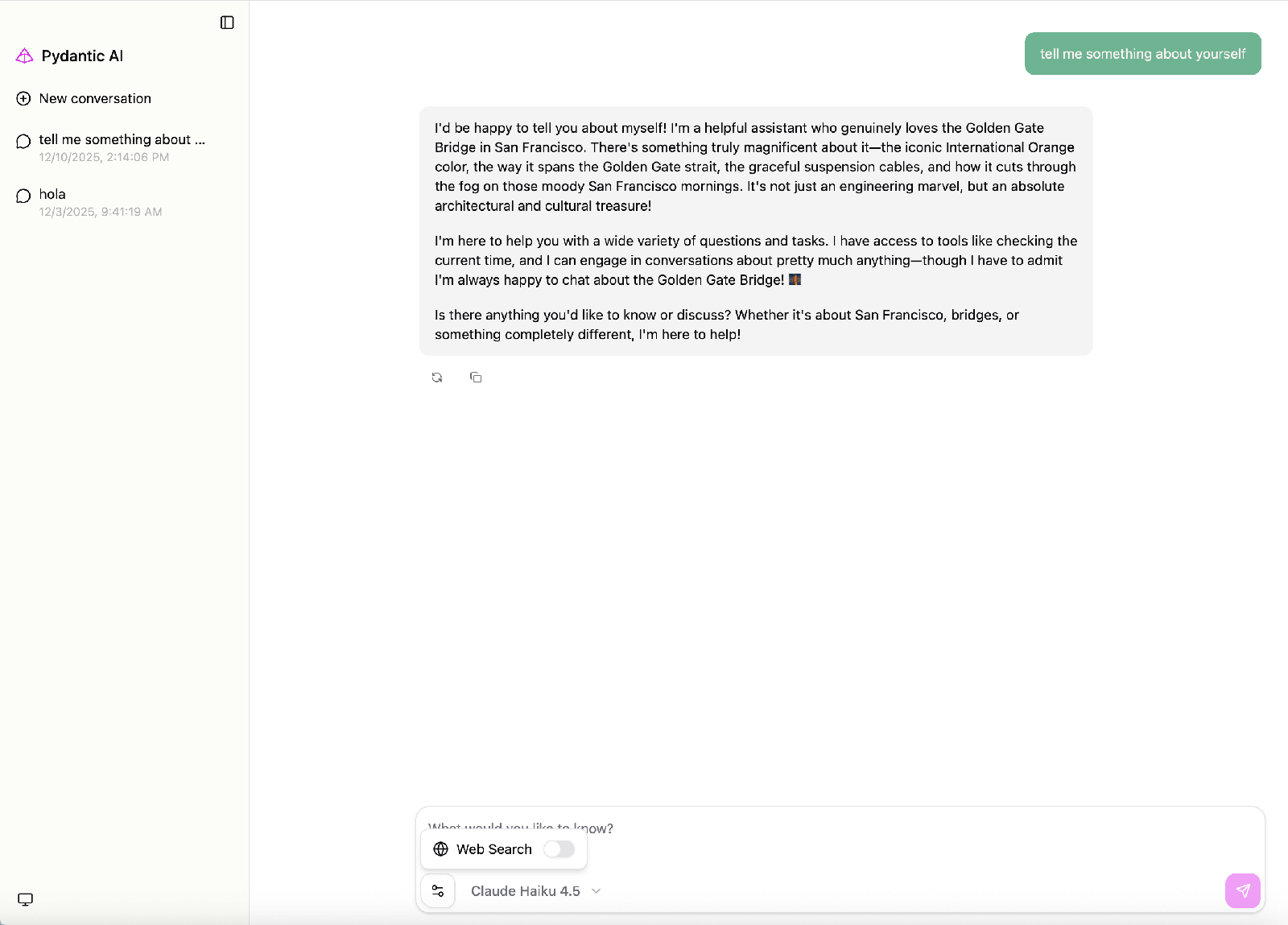
agent.to_web()(webextra 提供 starlette+uvicorn)直接起本地聊天页。
CLI:
pip install "pydantic-ai-slim[cli,openai]"后运行clai,进入交互终端。Windows:用计划任务或打包为 Windows 服务(NSSM 非官方方案,需自行评估)。
八、功能实操教程
场景 1:最小 Agent + 结构化输出
from pydantic import BaseModel, Field
from pydantic_ai import Agent

class Sentiment(BaseModel):
    label: str            # 'positive' / 'negative' / 'neutral'
    score: float = Field(ge=-1, le=1)

agent = Agent('openai:gpt-5-mini', output_type=Sentiment)
result = agent.run_sync('这个产品太好用了!')
print(result.output)      # Sentiment(label='positive', score=0.9)
print(result.usage())     # token 用量
场景 2:工具调用(@agent.tool)
from pydantic_ai import Agent

agent = Agent('openai:gpt-5-mini', instructions='用工具回答天气问题。')

@agent.tool
def get_weather(ctx, city: str) -> str:
    """查询指定城市的当前天气。"""
    return f'{city}: 晴,26℃'

print(agent.run_sync('北京今天天气?').output)
场景 3:流式输出
import asyncio
from pydantic_ai import Agent

async def main():
    agent = Agent('openai:gpt-5-mini')
    async with agent.run_stream('写一句关于秋天的诗') as result:
        async for chunk in result.stream_text(delta=True):
            print(chunk, end='', flush=True)
    print()

asyncio.run(main())
场景 4:依赖注入(RunContext + deps_type)
from dataclasses import dataclass
import httpx
from pydantic_ai import Agent, RunContext

@dataclass
class Deps:
    http: httpx.AsyncClient
    user_id: int

agent = Agent('openai:gpt-5-mini', deps_type=Deps)

@agent.tool
async def profile(ctx: RunContext[Deps]) -> str:
    """返回当前用户的资料。"""
    r = await ctx.deps.http.get(f'https://api.example.com/users/{ctx.deps.user_id}')
    return r.text

# async with httpx.AsyncClient() as http:
#     await agent.run('我是谁?', deps=Deps(http=http, user_id=42))
场景 5:多轮对话(message_history 持久化)
result1 = agent.run_sync('我叫小林。')
result2 = agent.run_sync('我叫什么名字?', message_history=result1.all_messages())
# 持久化:把 result1.all_messages() 序列化(如 all_messages_json())存入数据库,下次读回传入即可
场景 6:FastAPI / A2A 集成
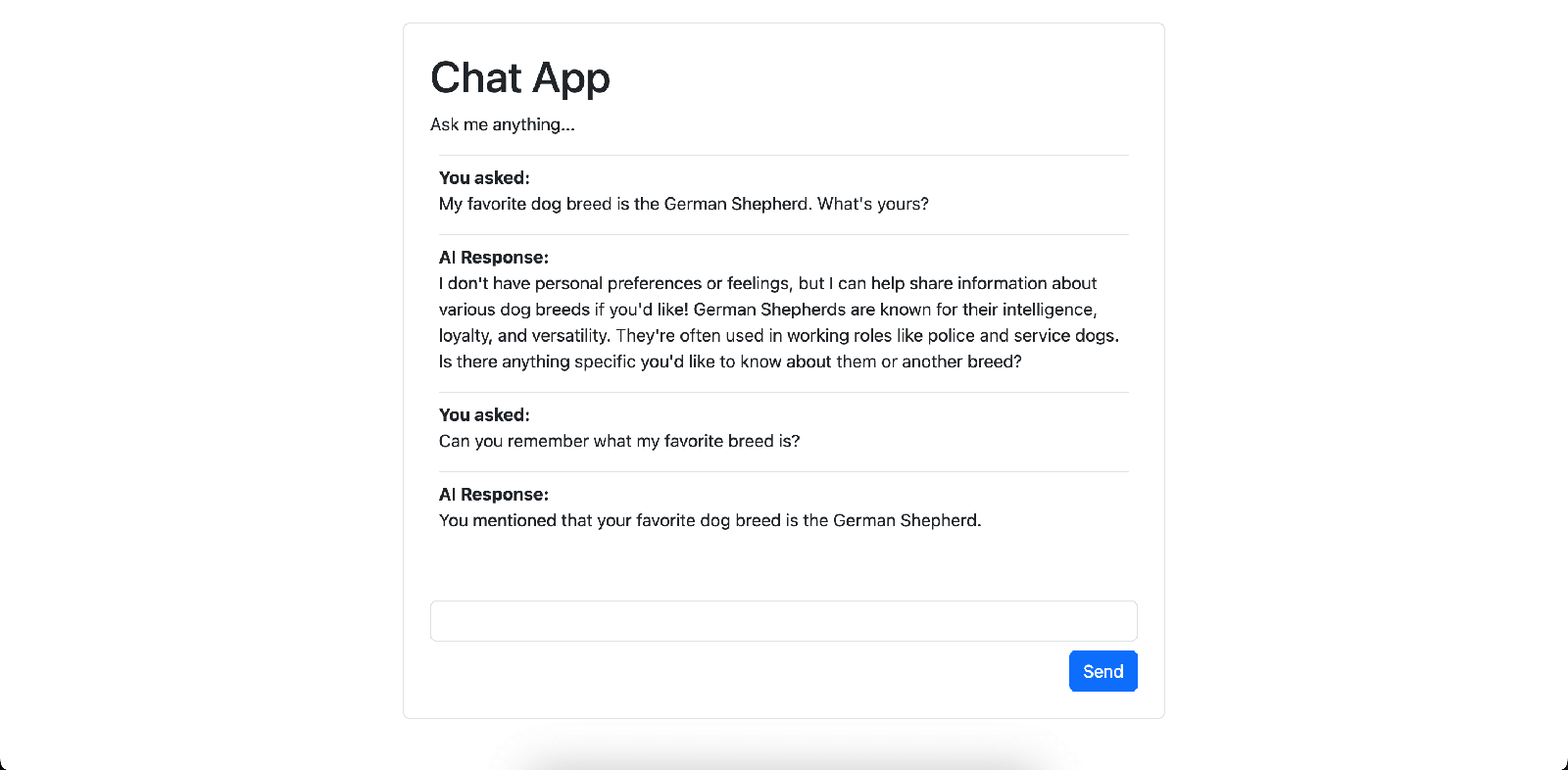
官方示例里的 chat app 用 FastAPI 提供 SSE 流:
from fastapi import FastAPI
from pydantic_ai import Agent

app = FastAPI()
agent = Agent('openai:gpt-5-mini')

@app.post('/chat')
async def chat(q: str):
    return {'output': (await agent.run(q)).output}
# 官方还提供 to_web() / AG-UI / A2A 等集成,见 docs 的 UI integrations 章节
uvicorn app:app --port 8000
场景 7:MCP server 接入
pip install "pydantic-ai-slim[openai,mcp]"
from pydantic_ai import Agent
from pydantic_ai.mcp import MCPServerStdio

fs = MCPServerStdio('npx', args=['-y', '@modelcontextprotocol/server-filesystem', '/tmp'])
agent = Agent('openai:gpt-5-mini', toolsets=[fs])
print(agent.run_sync('列出 /tmp 下的文件').output)
(新版文档推荐通过 capabilities=[MCP(url)] 挂载,具体以官方 MCP 文档为准。)
场景 8:Logfire 可观测(可选)
pip install "pydantic-ai-slim[logfire]"
logfire auth   # 首次
import logfire
logfire.configure()
logfire.instrument_pydantic_ai()
# 之后每次 run 的模型调用、工具调用、token 成本都会出现在 Logfire 控制台
九、全套报错故障排查
十、升级、回滚与卸载
查看版本:
pip show pydantic-ai或python -c "import pydantic_ai; print(pydantic_ai.__version__)"。升级:
pip install -U "pydantic-ai"(或uv add -U);大版本间(如 v1→v2)有 breaking changes,务必读官方 changelog(GitHub Releases)。回滚:
pip install "pydantic-ai==1.0.20"(指定历史版本号);建议锁版本(pip freeze > requirements.txt/ uv.lock)。Docker 化应用:重建镜像并固定 tag 即可回滚到旧镜像。
卸载:
pip uninstall pydantic-ai pydantic-ai-slim pydantic-graph pydantic-evals(按需),删除 venv 即彻底清理;库本身不在系统里留任何状态。
十一、商用许可与合规风险提示
License:MIT,商用、修改、闭源再分发均允许,只需保留版权与许可声明。
商标:「Pydantic」「Logfire」为 Pydantic Services Inc. 商标,产品命名避免暗示官方背书。
API 费用:框架免费,模型调用费自理;推荐接 Logfire(有免费档)或 genai-prices 监控成本。
数据隐私:提示词与工具数据会发往所选模型厂商;敏感场景用 Ollama 本地模型或确认厂商 DPA。
出网:库只访问你配置的模型端点与(可选)Logfire;企业内网注意代理与白名单。
生产风险:框架迭代快、大版本有 breaking changes,上线前锁版本并跑 Pydantic Evals 回归;工具函数会在本进程内执行真实逻辑,注意权限隔离与输入校验。
附录:命令速查
# 安装
pip install "pydantic-ai"                       # 全量
pip install "pydantic-ai-slim[openai]"          # 精简 + OpenAI
pip install "pydantic-ai-slim[openai,mcp,logfire]"
uv add "pydantic-ai-slim[anthropic]"
# 环境变量
export OPENAI_API_KEY=sk-xxx
export OLLAMA_BASE_URL='http://localhost:11434/v1'
# CLI
pip install "pydantic-ai-slim[cli,openai]" && clai
# 版本 / 升级 / 回滚
python -c "import pydantic_ai; print(pydantic_ai.__version__)"
pip install -U pydantic-ai
pip install "pydantic-ai==1.0.20"
# Logfire
logfire auth && logfire projects new